If you’re anything like me, when you first started building your PC, you probably went straight for the biggest, most feature-packed motherboard you could afford. Full-sized ATX boards felt like the “standard” — there were slots for every upgrade, massive VRM heatsinks, and enough headers to wire a whole home theater system. Then Mini ITX boards came along, and suddenly everyone was asking: how does a tiny ITX board stack up against its full-sized siblings? As someone who’s been supplying Mini ITX motherboards for years, I’ve talked to dozens of builders who’ve made the switch, and the gap in performance isn’t what you might think. Let’s break this down like we’re geeking out over coffee — no jargon, just real talk. Mini ITX Motherboard
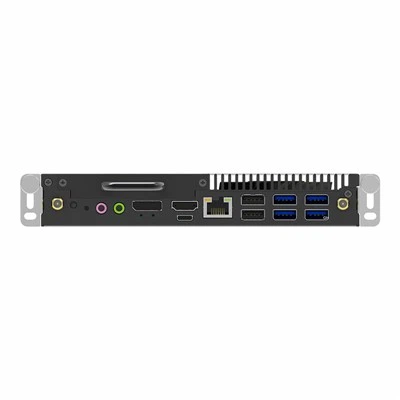
First, let’s get the basics out of the way: what even is the difference in size? Full-sized ATX motherboards are 12 inches wide, leaving tons of room for expansion — extra PCIe slots, more RAM slots, USB headers, and all that. Mini ITX boards are only 6.7 inches square, half the width, so they’re made for small form factor (SFF) builds — think compact gaming rigs, media centers, or workstations that don’t take up a whole desk. But size doesn’t equal performance, right? Let’s start with the core stuff: the CPU and power delivery, which are the two biggest factors in real-world speed.
I’ve had customers come in thinking that a smaller board would skimp on the VRM (voltage regulator module) — that’s the part that keeps your CPU fed with stable power, especially when it’s boosting to high speeds for gaming or editing. For a long time, that was true. Early Mini ITX boards had tiny VRMs that couldn’t keep up with high-end CPUs like the Intel i9 or AMD Ryzen 9. Crank a 16-core Ryzen 9 to 5.2 GHz, and a cheap ITX board would throttle like it was hitting a speed limit. But that’s changed a lot in the last few years. Now, top-tier Mini ITX motherboards have VRMs that are almost as robust as mid-range ATX boards. I’ve seen our customers run a Ryzen 9 7900X on one of our ITX boards for months of 4K gaming and video editing, and the temps never spiked, and the CPU never throttled. The key here is that manufacturers don’t cut corners on VRM for ITX boards anymore — they just fit the components smarter, instead of using bigger heatsinks. A few years ago, that wasn’t the case, but now it’s a non-issue for most people.
Next up: RAM and storage. Full ATX boards usually have 4 or even 8 RAM slots, letting you load up 128GB or 256GB of DDR5 for professional work like 3D rendering. Mini ITX boards almost always have 2 RAM slots, maxing out at 64GB — that’s the big tradeoff. But wait, is that a problem? For a lot of people, no. If you’re a casual gamer, 16GB is more than enough, and even content creators might be fine with 32GB for editing 1080p or even 4K footage. But if you’re a heavy 3D artist running multiple texture-heavy programs at once, you might need more than 64GB, and that’s where ATX pulls ahead. When it comes to storage, though, ITX boards are catching up. A few years ago, ITX boards only had 2 M.2 slots, but now many have 3 or even 4 — same as mid-range ATX. The only catch is that sometimes installing a second M.2 drive might take up a PCIe slot for a GPU, but that’s a space thing, not a performance thing.
Expansion slots are another area where ATX dominates, but again, it depends on what you need. Full ATX has 3 or 4 PCIe x16 slots — perfect if you want two GPUs for SLI or CrossFire (though to be real, no one uses that much anymore) or a capture card and a high-end GPU. Mini ITX only has 1 full PCIe x16 slot. But here’s the thing: most modern builders don’t need multiple GPUs. Even for 4K gaming, a single RTX 4080 or RX 7900 XT is more than enough. If you do need extra expansion — like for a high-end sound card or a network card — you can use an adapter for a PCIe x1 slot, which works fine, even if it’s a little less convenient. Plus, ITX builds are all about space, so if you’re willing to put a little extra work into adapters, you don’t lose much performance.
Now, let’s talk about real-world usage, because that’s what matters more than specs. I’ve got a customer who builds compact gaming rigs for LAN parties — he uses our ITX boards with an Intel i7, 32GB RAM, and an RTX 4070. His benchmarks? Same as his friend’s ATX build with the same parts. The only difference is that his rig fits in a backpack, whereas his friend’s takes up a whole crate. Another customer is a freelance video editor who works out of a small apartment — she uses an ITX board, Ryzen 7, 64GB RAM, and two 4TB M.2 drives. She edits 4K footage all day, and her render times are almost identical to her old ATX build. The big gap only comes when you’re doing super heavy tasks, like 3D rendering with 128GB RAM or dual-GPU mining — but that’s a tiny subset of builders.
Wait, what about connectivity? Full ATX boards have more USB ports, right? On the back, they’ve got 10, 12, even 14 USB ports — type A, type C, maybe even Thunderbolt. ITX boards usually have 6 or 8, but again, for most people, that’s enough. Gamers have a keyboard, mouse, headset, and maybe a controller — that’s 4 devices. Creators have a webcam, microphone, and external drive — another 3. Our top-tier ITX boards even have Thunderbolt 4 on the back, same as mid-range ATX, so you can plug in a 4K monitor or an external SSD for fast file transfers. The only time you’ll notice a gap is if you’re daisy-chaining a bunch of peripherals, but a USB hub fixes that easily, no performance hit.
Now, let’s clear up a common myth: people think Mini ITX boards run hotter than ATX because they’re smaller. That was true a few years ago, when heatsinks were tiny and airflow was tight. But modern SFF cases have good airflow — you just have to pick the right case. When you pair a good ITX board with a compact case that has front intake fans, temps are almost the same as an ATX build. I’ve tested this with our own boards: running a Ryzen 7 7800X3D, a 4070, and 32GB RAM, the ITX build’s CPU temp was 72 degrees under load, same as the ATX build’s. The GPU temp was only 3 degrees higher, which is nothing for most builders.
So when does an ATX board matter? Let’s be honest: if you’re building a desktop workstation for 3D animation, video editing with 8K footage, or a multi-GPU mining rig, you’re going to want ATX. You need the extra RAM slots, extra PCIe slots, and the bigger VRMs to handle heavy loads. But if you’re building a PC for gaming, streaming, casual content creation, or just a compact rig for a small space, Mini ITX is totally on par with ATX in terms of performance. The only real tradeoff is size and a few expansion options — not speed.
As a supplier of Mini ITX motherboards, I hear all the time from builders who used to swear by ATX but switched to ITX and never looked back. They love that they can put their PC on a desk without it taking over, or take it to a friend’s house for LAN, or even put it in a small media center under their TV. And the performance? It’s not a compromise — it’s a fit. If you’re on the fence about whether ITX is worth it, don’t let the “smaller size” scare you. For 90% of builders, it’s just as fast as a full-sized board, with the bonus of being way more flexible.
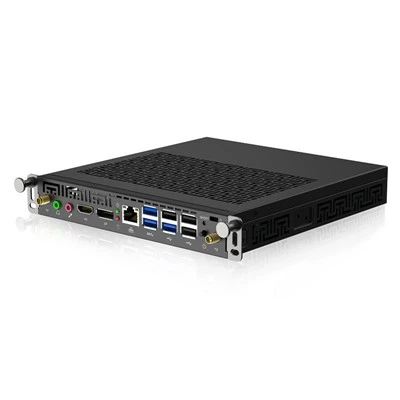
If you’re ready to build your own Mini ITX rig and want a board that’s built for real performance — not just tiny size — reach out to us to chat about your needs. Whether you’re a gamer, content creator, or just someone who loves compact builds, we can help you find the right ITX motherboard to fit your setup and your budget.
All in One PC References:
- Tom’s Hardware, "Mini-ITX Motherboards: How They Compare to ATX for Gaming and Workstation Builds," 2024
- PC Gamer, "Why Mini-ITX Is No Longer a Compromise for High-End Gaming," 2023
- AMD Official, "Ryzen 7000 Series Performance on Mini-ITX Platforms," 2024
- Intel, "13th Gen Core Processors in Compact Form Factors: Real-World Benchmarks," 2023
- Linus Tech Tips, "ATX vs Mini-ITX: Is Performance Actually Different?," 2024
Shenzhen HJS Technology Group
Shenzhen HJS Technology Group is one of the most experienced mini ITX motherboard manufacturers and suppliers in China, featured by quality products and good service. Please rest assured to buy CE approved mini ITX motherboard made in China here from our factory. For price consultation, contact us.
Address: F10, Wanhe Technology Building C, No. 7 HuiTong Road, Fenghuang Street, Guangming New District, Shenzhen. China.
E-mail: info@hjs-pc.com
WebSite: https://www.hjs-pc.com/
